
"Compiled" Specs

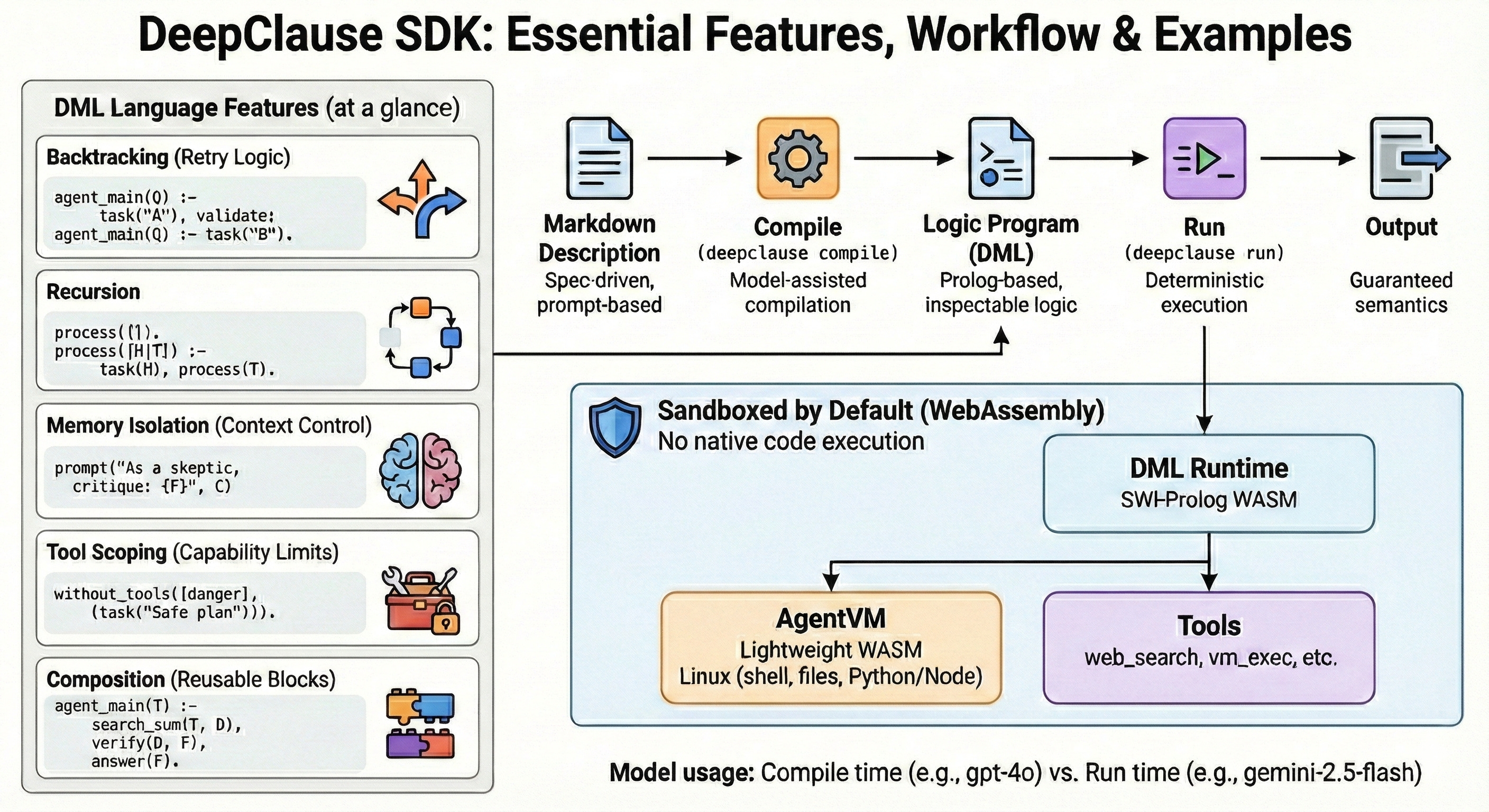
Compiled Specs: The Missing Layer?
There is a growing movement around “Spec-Driven Development” (SDD) in the AI space. Tools like Claude Code, Gemini, Kiro and Tessl are trying to shift the focus from writing code to writing specifications, which agents then implement.
It makes sense. Natural language is the new interface, but natural language is also messy. We need structure.
But usually, these “specs” are just really detailed prompts. They might be formatted as Markdown or distinct files, but at runtime, they are fed into the context window just like any other instruction. The LLM reads the spec and tries to follow it.
If the LLM ignores a “MUST” requirement, or hallucinates a step, the spec is meaningless. Of course, the situation has gotten better over the last year or so, but as LLMs, even the most SOTA-ones are still probabilistic, there is no guarantee yet, that they will actually follow instructions.
I’ve been working on a different approach with DeepClause. Instead of treating the spec as context, what if we treated it as source code?
The Markdown “Compiler”
Let’s start with the compile command of the DeepClause CLI. It takes a standard Markdown task description and compiles it into DML (DeepClause Meta Language), executable by a Prolog-based runtime.
It looks like this. You write a spec in api-client.md:
# API Client Generator

Generate a TypeScript API client from an OpenAPI spec.

## Arguments

- SpecUrl: URL to the JSON spec

## Behavior

- Fetch the spec from SpecUrl
- Extract endpoints
- Generate the client code
You run `deepclause compile api-client.md`, and it generates `api-client.dml`.
This will compile your prompt into a small logic program.
Why Logic?
When an LLM runs a standard “chain” or “flow,” the control logic is often fuzzy. Did it really finish step A? Is it actually falling back to step B, or did it just hallucinate that it did?
By compiling to Prolog, we get guaranteed execution semantics.
The generated DML looks something like this:
agent_main(SpecUrl) :-

    task(”Fetch OpenAPI spec from {SpecUrl}”, Spec),
    task(”Extract endpoints”, Endpoints),
    task(”Generate client code”, Code),
    exec(vm_exec(command: “cat > client.ts”), Code).

agent_main(SpecUrl) :-
    output("Sorry, it looks like something went wrong! Goodbye!").
This is a logic program. It has properties that prompts don’t have:
1. Atomicity: `task/2` either succeeds or fails.
2. Backtracking: If `vm_exec` fails (e.g., disk full), the runtime backtracks. It can undo the state and try a different path if one was defined. In the above simplified example it will simply backtrack to the second agent_main branch and output an error message, then terminate.
3. Variables: `SpecUrl` is a bound variable. It’s not just text in a context window; it’s a symbol in the logic engine.
The “Vibes” vs. The Machine
The goal here isn’t to force everyone to write Prolog. Most people (myself included) find Markdown much faster to write.
We want to keep the “vibes” of natural language specs—easy to read, easy to edit—but enforce the rigor of a compiled runtime.
When you compile a spec, you lock in the behavior. You can inspect the `.dml` file and see exactly what the agent can and cannot do. You can see the tool scopes. You can see the flow control.
It turns the spec from a “suggestion” into a program.
Just a Compiler
At its core, this is just a compiler. It takes high-level intent (Markdown) and lowers it to machine-verifiable instructions (DML/Prolog).
We are still exploring what this means for complex agents, but the early results are promising. If you want to try it out, the SDK is open source. You can define your specs, compile them, and watch the logic engine do its work.
Appendix: More DML Language Features Exemplified
## Deep Research in DML

Here is a full example of a Deep Research agent. It mixes **tools**, **human-in-the-loop confirmation**, and **multi-step reasoning**.

Notice how it looks like a script, but it's actually a logic program.

% DML program for a deep research agent that generates a cited report.
% It analyzes a question, creates a research plan, asks the user for
% confirmation, executes the plan using web search, and saves the
% final report to a file.

% --- Tool Definitions ---
% Only tools that are defined in the tool/2 wrapper may be used by task/N predicates in the same DML program.
% Any call to an external tool living outside the runtime has to go through the exec predicate

% Web search tool wrapper.
tool(search(Query, Results), "Search the web for information on a given query. Returns a list of search results.") :-
    exec(web_search(query: Query, count: 10), Results).

% Tool for asking the user for input or confirmation.
tool(ask_user(Prompt, Response), "Ask the user a clarifying question or for confirmation and get their response.") :-
    exec(ask_user(prompt: Prompt), Result),
    get_dict(user_response, Result, Response).

% --- Main Agent Logic ---


% Main entry point
agent_main(Question) :-
    system("You are a meticulous research assistant. Your goal is to conduct comprehensive research, synthesize findings, and generate a detailed report with citations.
- If the user's question is ambiguous, you must ask for clarification using the ask_user tool.
- For controversial topics, you must present multiple viewpoints.
- If you find limited sources, explicitly state this and the confidence level in your findings.
- Always cite your sources within the report and list them in a 'Sources' section at the end."),

    output("Step 1: Analyzing the research question..."),
    task("Analyze the user's question to identify key topics and sub-questions for research. Question: '{Question}'.  Store the key topics as a formatted list in KeyTopics.", KeyTopics),

    output("Step 2: Creating a research plan..."),
    task("Based on these key topics, create a step-by-step research plan. Topics: {KeyTopics}. The plan should be clear and concise. Store the plan as a formatted string in ResearchPlan.", ResearchPlan),

    output("Step 3: Confirming the plan with the user..."),
    confirm_plan(ResearchPlan),

    output("Step 4: Executing research and generating the report..."),
    task("Execute the approved research plan: {ResearchPlan}.
Use the search tool to find authoritative sources for each topic.
For each source, extract key findings, evidence, and opinions.
Synthesize all information into a coherent, well-structured report in Markdown format.
The report must include inline citations and a 'Sources' section at the end.
Store the final, complete report in FinalReport.", FinalReport),

    output("Step 5: Saving the report to a file..."),
    generate_filename(Question, Filename),
    save_report(Filename, FinalReport),

    format(string(AnswerMsg), "Research complete. Report saved to ~s.", [Filename]),
    answer(AnswerMsg).

% --- Helper Predicates ---

% Asks the user to confirm the research plan before proceeding.
% Uses a task with ask_user to facilitate an interactive dialog where the user
% can request modifications until they approve the plan.
confirm_plan(Plan) :-
    task("Present this research plan to the user and get their approval:

{Plan}

Use the ask_user tool to present the plan and ask if they approve.
- If they approve (yes/ok/looks good/etc.), set Approved to 'yes'.
- If they want changes, use ask_user to clarify what changes they want,
  then revise the plan and ask again. Continue this dialog until they approve.
- If they want to cancel entirely, set Approved to 'cancelled'.

Store 'yes' or 'cancelled' in Approved.", Approved),
    ( Approved == "yes" ->
        output("Plan approved. Proceeding with research.")
    ;
        answer("Research cancelled by user."), !, fail
    ).

% Generates a file-safe name for the report based on the question.
generate_filename(Question, Filename) :-
    task("Generate a short, file-safe slug from this question: '{Question}'. For example, 'What is the future of AI?' could become 'future_of_ai'. Use underscores instead of spaces. Store only the slug in Slug.", Slug),
    atom_string(SlugAtom, Slug),
    atom_concat('report_', SlugAtom, BaseName),
    atom_concat(BaseName, '.md', FilenameAtom),
    atom_string(FilenameAtom, Filename).

% Writes the report content to the specified file.
save_report(Filename, Report) :-
    open(Filename, write, Stream),
    write(Stream, Report),
    close(Stream).